How to reset a forgotten Amazon password
A forgotten Amazon password can be replaced with a one-time code that Amazon sends to the email address or mobile number linked to the account. The process is the same in every country store, and the new password is valid in all of them, because it is a single account. It is harder if the old email address or phone number can no longer be reached: then account recovery has to be requested, which may involve proof of identity.
In this article
New password with a code
- In the store (for example amazon.com), choose sign-in and enter the account's email address or mobile number in the “Sign in or create account” step.
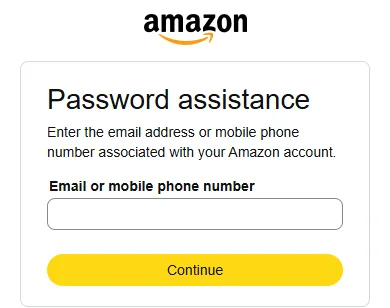
- In the next step, which asks for the password, click the forgotten password link (“Forgot password?”). The “Password assistance” page opens.
- Type the address or number linked to the account in the “Email or mobile phone number” field, then click “Continue”.
- If both an email address and a mobile number belong to the account, it is possible to choose where the code is sent. Amazon sends a one-time code (OTP).
- Enter the code on the page. The code is valid for a short time; if it has expired, a new one can be requested.
- Enter the new password, type it again and save it. A strong password not used anywhere else is recommended.
- If two-step verification is also turned on for the account, signing in requires the second-step code after the password as well.
The code does not arrive
- Symptom: no email arrives. Cause: the message ended up in the spam, promotions or trash folder, or the account was created with a different email address. Solution: search every folder for Amazon's name, and try the other possible addresses.
- Symptom: no text message arrives. Cause: wrong country code, weak signal, or the number blocks short messages. Solution: check the number and request the code again after a few minutes, or choose the email code instead.
- Symptom: “We cannot find an account with that email address”. Cause: no account belongs to this address; it may be a typo, or a different address or number belongs to the account. Solution: look for old order confirmations in the mailboxes; they show which address the messages went to.
- Symptom: too many attempts. Cause: a security limit. Solution: wait and try again later; requesting codes many times in a row does not help.
If the old email address or phone number is no longer available
If the email account linked to the Amazon account has been closed, or the phone number is gone, the code cannot be received. These are the options in that case:
- If both an email address and a mobile number belong to the account, request the code to the one that still works.
- If the account is still signed in on a device (phone app, Kindle, browser), update the email address or number there under “Login & security”; the reset will then work.
- If the email account can be recovered with the email provider, recover it first.
- If nothing works, Amazon offers an account recovery option on the sign-in page. This usually requires uploading a photo or scan of an official identity document showing the name and address; the document number can be covered. According to Amazon, processing can take 1–2 days, after which a notification is sent by email.
Security tips
The reset code must not be given to anyone, even if the caller claims to be an Amazon agent: Amazon does not ask for a code or password over the phone. If a code arrives although no one requested a reset, someone may be trying to sign in to the account: in that case it is worth signing in, changing the password and turning on two-step verification. About fake reset emails and calls: Common Amazon scams. If the account cannot be accessed not just because of the password but because Amazon has locked it: Locked or suspended Amazon account.
If it doesn't work
Does the new password work in every Amazon country store?
Yes, because it is a single account. Kindle, Audible and other Amazon apps will also ask for the new password.
Are orders or Prime lost when the password is reset?
No. Changing the password only affects sign-in; orders, addresses, Prime and digital content remain.
How can the password be changed if the old one is known?
After signing in, under “Login & security”, with the edit button next to the password; here the old and the new password have to be entered.