How to create an Amazon account
An Amazon account can be created in a few minutes with an email address or a mobile number. Signing in and signing up share the same first step: based on the address or number entered, Amazon decides whether to sign in to an existing account or create a new one. Where there is no local Amazon store, it is best to register straight away in the store that will be used for ordering, for example a store in a neighbouring country; the account can then be used in the other country stores as well.
In this article
Changing the interface language
Each store opens in its main language, but in many stores the language selector in the header, next to the account menu (a flag and a language code, for example “EN” on amazon.com), offers other languages too. For a signed-in user, the choice is kept for the next visit. In the Amazon Shopping app, the language can be changed in the settings, under country and language. Changing the language only affects the interface labels: sellers often provide product descriptions only in the store's main language, and the browser's translator can help with these. It is worth doing this before signing up, so that the registration steps also appear in an understandable language.
Signing up step by step
- Click the “Hello, sign in / Account & Lists” menu in the header. In the app, the process starts with the profile icon.
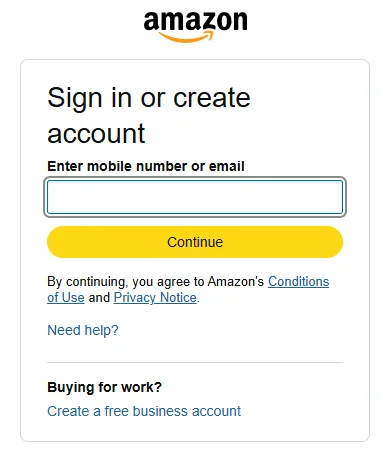
- The shared first step, “Sign in or create account”, appears. Type the email address or the mobile number (with the country code) in the “Enter mobile number or email” field, then click “Continue”. The “Create a free business account” link below it is for business buyers; private individuals do not need it.
- If no account belongs to the address or number yet, Amazon offers to create a new one. Enter a name and a password of at least 6 characters; a longer password not used anywhere else is recommended.
- Amazon sends a verification code by email or text message. Enter the code, and the account is created.
- If the address or number is already registered, Amazon asks for the password: in this case an account already exists, and the right step is to sign in rather than create a new one.
Email address or mobile number?
Both can be used to sign up, and the other one can be added to the account later under “Login & security”. Adding both is recommended: if the password is forgotten later, the reset code can be requested to either, and order notifications are sure to arrive. Choose an email address and a number that will stay in use for the long term; a work address or a temporary number can cause problems later. On resetting the password: How to reset a forgotten Amazon password.
Before the first purchase
- Delivery address: add it under “Your Account” → “Your Addresses”. The country can be chosen from a drop-down list; enter the house number, floor and flat number precisely, because a courier from another country does not always know the local address format.
- Payment method: a bank card can be added under “Your Payments”; depending on the country and store, other payment methods may be available. Some banks ask for an extra confirmation in the banking app at the first online payment.
- Deliverability: once the address is set, the product page shows whether the product can be shipped to that country. If not, another seller's offer or the same product in another store can often be delivered.
- Prime offer: at checkout, a prominent button often offers a free Prime trial. Anyone who does not want it should choose the standard delivery option: How to cancel Amazon Prime.
- Two-step verification: it can be turned on under “Login & security” and is strongly recommended, because the account stores a card and an address.
The account in another country store
The same email address or mobile number and password can be used to sign in on amazon.co.uk, amazon.de or amazon.com without a new registration. After the first sign-in there, it is worth checking the address and payment method, because these may appear differently in each store. Orders are always visible in the store where the purchase was made.
If it doesn't work
Is an Amazon account free?
Yes, creating an account and shopping are free. Only a Prime membership is paid, and it has to be chosen separately.
Can two Amazon accounts be created with one email address?
No, an email address or mobile number can belong to only one account. If the registration asks for a password, an account already exists for that address.
The verification code does not arrive. What should be done?
Look for the email in the spam and promotions folders as well, and for a text message, check the country code. A new code can be requested after a few minutes.
Is a separate account needed for Kindle or Prime Video?
No, the same Amazon account can be used. The Prime Video catalogue differs from country to country.