Using ChatGPT, from first sign-up to subscription
ChatGPT is OpenAI's AI-powered chatbot: it answers questions, writes and edits text, translates, summarizes and creates images. It can be used for free; a paid plan is needed for higher limits and more advanced features.
In this article
What is it used for?
- Answering questions and explaining concepts in simple terms.
- Writing and rewriting text: emails, letters, summaries, outlines, ads.
- Translation and proofreading.
- Analyzing and summarizing uploaded files, spreadsheets, PDFs and photos.
- Creating images from a text description.
- Voice conversations in the mobile app.
- Web search and summaries compiled from several sources (“Deep Research”).
- Programming help: writing and explaining code, debugging.
What is needed to use it?
- An internet connection and a web browser or the official app.
- A free OpenAI account: this requires an email address, but signing up with a Google, Microsoft or Apple account is also possible. Without an account, conversations cannot be saved.
- A minimum age of 13. Users under 18 need permission from a parent or guardian. For minors, ChatGPT automatically switches to a stricter experience for teens, and a parent can link their own account to the child's.
- For a paid plan, a bank card or another payment method offered at checkout. On mobile, the subscription can also be bought through the app store.
Where can it be used?
- In a web browser on a computer or phone: chatgpt.com. Nothing needs to be installed.
- In the app on Android and iPhone. The app also offers voice conversations and can answer questions about a picture taken with the phone's camera.
- In the desktop app on macOS and Windows, from chatgpt.com/download. Besides chat, the new desktop app includes document creation and programming (Codex); the previous version can still be downloaded as “ChatGPT Classic”.
- The same account works on every platform, and earlier conversations are available everywhere.
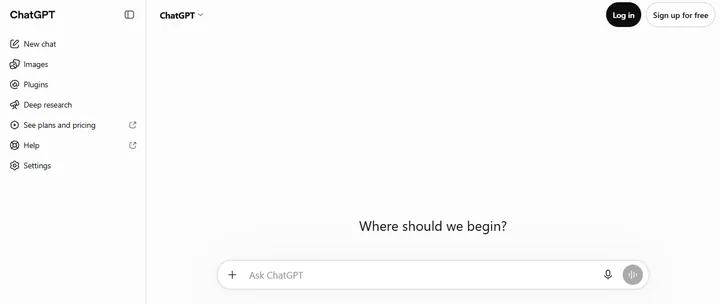
- Questions can also be asked on the home page without logging in, but then only one conversation is possible at a time, and it is not saved.
Official addresses
Login details should only be entered on these addresses. On the home page, “Log in” at the top right logs in to an existing account, and “Sign up for free” creates a new one.
- Home page, login and sign-up: chatgpt.com
- Plans and pricing: chatgpt.com/pricing (in the home page sidebar: “See plans and pricing”)
- App downloads: chatgpt.com/download
- Help Center: help.openai.com
- The developer's website: openai.com
- Terms of use: openai.com/policies/terms-of-use
Free or paid?
The basic service is free. The free plan limits the number of file uploads, image generations, voice conversations and deep research runs. Paid plans work as a monthly subscription; current prices and exact limits are on the official pricing page.
- Free: for everyday questions and shorter tasks.
- Go: higher limits than Free, for longer conversations.
- Plus: more advanced models, higher limits, projects and custom GPTs.
- Pro: the highest limits, for research and programming.
- Business and Enterprise: for companies and teams, with central account management. Educational institutions have a separate Edu version.
- The subscription can be canceled at any time; paid features remain until the end of the period already paid for. If the subscription was started in the App Store or on Google Play, it has to be canceled there.
Important things to know about the answers
- ChatGPT can make mistakes, and its answers can sound confident even when they are wrong. Before an important decision (health, law, money), always check them with a reliable source or a professional.
- Entering personal or sensitive data (passwords, bank card numbers, ID numbers, other people's data) is not a good idea.
- By default, OpenAI may use conversations to improve its models. This can be turned off in the settings under “Data controls” (“Improve the model for everyone”).
- A temporary chat can also be started: it does not appear in the history.
Security basics
- Turning on multi-factor authentication under “Security and login” in “Settings” is recommended. An authenticator app, a code sent by text message or a passkey can be chosen.
- The login code and the password should never be shared with anyone, even if the request appears to come from OpenAI.
- App stores contain many imitations with names and icons similar to ChatGPT. Only the app published by OpenAI should be installed; the safest way is to use the link on the official download page.
- Fake “ChatGPT” websites and ads also exist. Logging in should only happen at chatgpt.com.
Related services
The same OpenAI account also gives access to Codex, the programming assistant available in the new desktop app. The OpenAI API for developers (platform.openai.com) is a separate service with its own billing: a ChatGPT subscription does not include it.
Getting started
- Installing the ChatGPT app on a phone or computerDownloading the official ChatGPT app for Android, iPhone, Windows and Mac: installation, logging in, syncing and how to avoid fake apps.
- Logging in to ChatGPT on the web and in the appLogging in to ChatGPT with an email address, a Google, Apple or Microsoft account or a passkey, and why the same method must always be used.
- Creating a ChatGPT account step by stepSigning up for ChatGPT with an email address or a Google, Apple or Microsoft account: verification code, date of birth, age limit and…
Using and settings
- ChatGPT privacy settingsWhere to stop ChatGPT conversations from being used to improve the models? Temporary chat, memory, shared links and data export.
- Managing and canceling a ChatGPT subscriptionCanceling a ChatGPT subscription on the web, iPhone and Android, changing plans, invoices and refunds: what remains after canceling and…
- Searching, archiving and deleting ChatGPT chat historyHow to search, rename, archive and delete earlier ChatGPT conversations one by one or all at once, and how to organize chats into projects.
- Permanently deleting a ChatGPT accountDeleting a ChatGPT account on the web and in the app: what happens to the subscription and the data, and when the same email address can…
- Managing ChatGPT memory and custom instructionsWhat does ChatGPT remember? Viewing and deleting saved memories, using chat history and setting up custom instructions, step by step.
Troubleshooting
- Common ChatGPT login problems and how to fix themChatGPT verification code not arriving, wrong login method, lost authenticator or a stuck browser? Causes and fixes, sorted by symptom.
- “Unsupported country” error in ChatGPT: where it is unavailable and whyWhat the “unsupported country” error in ChatGPT means, where ChatGPT is not officially available, and what to do if it appears in a…
Security
- Hacked ChatGPT account: first stepsUnknown conversations or logins in a ChatGPT account? Warning signs, password change, logging out all devices, multi-factor protection…
- Two-step verification and passkeys in ChatGPTTurning on ChatGPT multi-factor authentication with an authenticator app, setting up a passkey, the recovery code and 2026's Advanced…
Tips and tricks
If it doesn't work
Is ChatGPT free?
Yes, the basic version is free, but file uploads, image generation and some features are limited. A paid plan is needed for higher limits.
Can it be used without signing up?
To a limited extent: questions can be asked on the home page, but the conversation is not saved, and starting a new one discards the previous one. History and file uploads require an account.
Which languages does it understand?
Many languages, including English. Questions can be asked in any of them, and it answers in the same language. The interface is also available in many languages.
From what age can it be used?
From 13. Users under 18 need permission from a parent or guardian, and the account runs in the teen experience.
How far can its answers be trusted?
Answers can be wrong. For important matters, always check them with another reliable source.