Creating a ChatGPT account step by step
A ChatGPT account can be created for free in a few minutes on chatgpt.com or in the app. All it takes is an email address, or an existing Google or Apple account.
In this article
Before signing up
- Age limit: ChatGPT cannot be used under 13, and parental consent is required between 13 and 18 (OpenAI Help). According to the terms of use, if a country sets a higher minimum age, that age applies.
- Free: a new account starts on the free plan, and no bank card is needed to create it.
- A long-term email address: use an address that will still be accessible years from now, because login and password reset emails are sent there.
- It can be tried without an account: chatgpt.com also opens without logging in (the “Try it first” link in the sign-up window leads there too), but conversations are then not saved, and features such as file uploads and image generation are not available.
- A phone number alone is often not enough: the sign-up window shows a “Continue with phone” button, but sign-up with only a phone number and no email address is available in just a few countries; the help center list shows which ones.
Which sign-up method to choose?
The choice matters because the same method has to be used for every login later. Accounts created with different methods can be separate accounts, and OpenAI does not merge them.
- Email address: does not depend on any other service. Logging in requires a password or a code received by email.
- Google or Apple account: there is no separate ChatGPT password; logging in happens with the existing account. If access to the Google or Apple account is lost, reaching the ChatGPT account becomes difficult too.
- Apple with a hidden email address: if Apple offers to hide the email address and this is accepted, the account is tied to an address ending in @privaterelay.appleid.com. This account can later only be accessed with Apple, using the same Apple Account.
Signing up in a web browser
- Open chatgpt.com and click “Sign up for free” in the top-right corner (the download page has the same button). If a cookie banner covers the buttons, close it first.
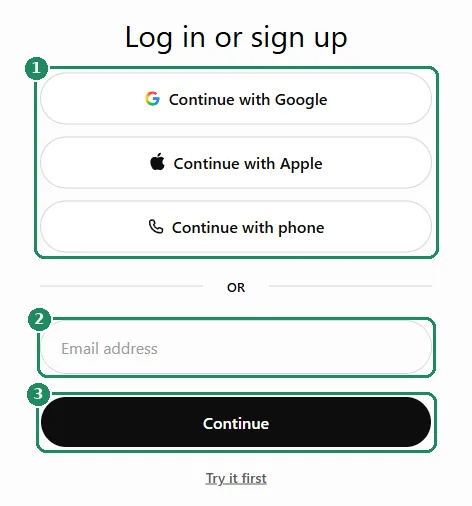
- In the “Log in or sign up” window that opens, choose how to sign up:
- for an email address, type it into the “Email address” field, then click “Continue”,
- for a Google or Apple account, click “Continue with Google” or “Continue with Apple”, log in in that service's window and approve access.
- When signing up with an email address, set a password. A password of at least 12 characters that is not used anywhere else is recommended.
- OpenAI sends a confirmation email to the address given. Type the code from the email, or click the confirmation button in it. If several codes have arrived, the most recent one is valid.
- Enter a name and date of birth, then continue. The date of birth should be entered truthfully, because it cannot be changed freely in the settings later.
- The ChatGPT home page then opens, and the first conversation can begin.
Signing up in the phone app
- Install the ChatGPT app from Google Play (Android) or the App Store (iPhone, iPad). Only the app published by OpenAI is official. Details: Installing the ChatGPT app on a phone or computer.
- Open the app and choose to sign up.
- Choose one of the methods offered (email address, or Google or Apple account), then enter the verification code, name and date of birth just as in the browser sign-up.
- On Android, sign-up and login go through the Chrome browser. If Chrome (or Brave) is not on the phone, an error message may appear; in that case, install Chrome.
Age limit and age verification
Besides the date of birth given at sign-up, ChatGPT may also estimate from usage whether the user is over 18.
- If the estimate suggests the user is under 18, ChatGPT automatically turns on the teen experience, with stricter content filtering. The account keeps working.
- If this happened by mistake, adult age can be verified in the account section of the settings, where the option is available, with the help of an outside company (Persona), using a live selfie or an ID document.
- Persona deletes the uploaded image and document within 7 days; OpenAI only receives the date of birth or the result of the check. Details: Age prediction in ChatGPT.
Common sign-up errors
- It says this user already exists: a sign-up with this address was already started or completed earlier. Log in instead of signing up; if the password is unknown, a new one can be requested at login. Details: Logging in to ChatGPT.
- The confirmation email does not arrive: check the spam folder and request a new code. Adding [email protected] to the safe senders list is recommended.
- An endless browser check loop: a VPN, a proxy, an ad or script blocker, or blocked cookies can cause it. Turn these off, or try in a private window or on another network (for example mobile data).
- The Google or Apple button is missing: a full page reload, another browser or a private window can help. Turn off extensions that modify page content.
- The email address of a previously deleted account does not work: the address of an account deleted by its owner can be reused at least 30 days after the deletion. Until then, sign up with another address. Old conversations do not appear in the new account.
Worth doing after signing up
- Turn on multi-factor authentication in the security section of the settings: with an authenticator app, a code sent by text message or a passkey, nobody else can log in even if they know the password.
- Review the privacy settings, for example whether conversations can be used to improve the models: ChatGPT privacy settings.
- Install the app on a phone or computer: Installing the ChatGPT app.
- Before choosing a paid plan, read how it can be changed or canceled later: Managing and canceling a ChatGPT subscription.
If it doesn't work
Does signing up cost anything?
No. A new account starts on the free plan, and no bank card is needed to create it. A paid plan can be chosen separately later.
Is it possible to sign up with only a phone number?
Only in some countries. According to the help, sign-up with a phone number and no email address is available in a limited number of countries (for example Germany, Poland and France), and there are no plans to extend it to more regions. Everywhere else, sign-up works with an email address or a Google, Apple or Microsoft account.
Can the login method be changed later?
Partly. An account created with an email address and password can later be linked to Google, Microsoft or Apple login if the email address matches; after that, both methods lead to the same account. In the opposite case, switching is done by changing the email address. Details: OpenAI Help.
I received a confirmation email, but I did not sign up
Someone probably typed the email address on the sign-up page. As long as nobody clicks the confirmation in the email, no account is created and no charges arise, so the email can be ignored.
Can the same account be used on a phone and a computer?
Yes. The account is not tied to a device: in the browser and in the apps alike, log in with the same method. Details: Logging in to ChatGPT on the web and in the app.