Permanently deleting a ChatGPT account
Deleting a ChatGPT account is permanent: conversations, projects, memory and custom GPTs are lost, and the account cannot be restored later. With the same login, the OpenAI developer platform account is closed as well. Before deleting, sort out the subscription and download any important data.
In this article
- Cancel it first in the Apple or Google account
- Deleting the account does not end it
- Then the account can be deleted
- A web subscription ends with the deletion
- The fee for the remaining period is not refunded
- The account can be deleted right away
Before deleting
- Subscription: a subscription started in an app store is billed by Apple or Google, and deleting the account does not stop it. The cancellation steps: Managing and canceling a ChatGPT subscription.
- Saving data: the export is a ZIP file containing the conversations and the account data; preparing it can take several days. Details: ChatGPT privacy settings.
- Developer use: the organization, keys and balance of the OpenAI API are also tied to this login. If the account is a member of other organizations or owns an organization, that has to be handed over or settled first.
- Work and education accounts: in a Business, Enterprise or Edu workspace, users cannot delete the account themselves; the workspace owner or administrator handles it.
- Login: deletion may require a recent login. If ChatGPT asks to log in again, log out, log back in and continue right away.
- An account that cannot be logged in to: first regain access (Common ChatGPT login problems and how to fix them), or request deletion on the privacy portal. If a stranger has taken over the account, change the password before deleting in any case: Hacked ChatGPT account: first steps.
Deleting on the web
- Log in at chatgpt.com with the account to be deleted. If there are several accounts (for example one with an email address and one with Google), make sure the right one is open.
- Click the profile icon in the bottom-left corner, then “Settings”.
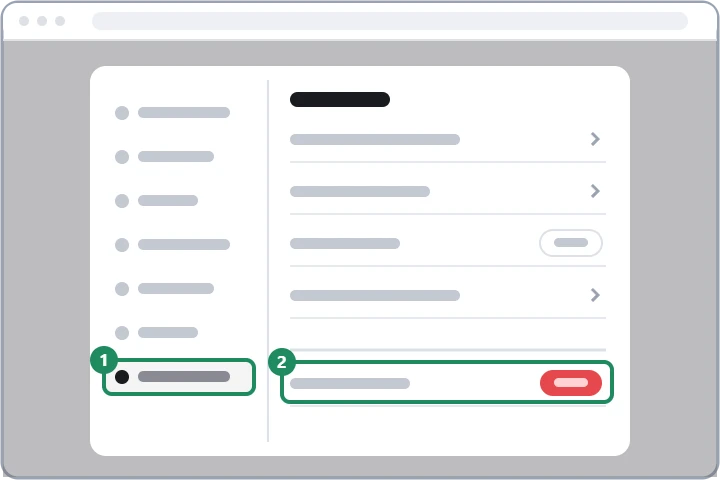
- Open the “Account” section (1), and at the bottom of the page choose the “Delete account” row (2).
- The window that appears summarizes the consequences. Type the requested word (DELETE on the English interface) in the confirmation field and confirm with the “Permanently delete my account” button.
Deleting in the phone app
In the iOS and Android apps, open the sidebar and tap the profile name to reach the settings; the deletion is in the account section there. The process is the same as on the web, and the deletion applies to all devices. Uninstalling the app does not delete the account by itself, and it does not cancel the subscription. Account deletion can also be requested on the OpenAI privacy portal (privacy.openai.com), for example if the option does not appear in the settings.
What happens after deletion?
- Access to ChatGPT and to other OpenAI products with the same account ends immediately.
- OpenAI deletes the account data within 30 days, except for a narrow set it must keep longer for legal or security reasons.
- Shared conversation links stop working, and custom GPTs, projects, uploaded files, saved memories and scheduled tasks become unavailable. Custom GPTs published in the GPT Store can no longer be used by others either.
- A subscription bought on the web ends; deletion does not give an automatic refund for the period already paid.
- A deleted account cannot be restored in any way, and support cannot recover it either.
Can the same email address be used again?
According to the OpenAI help, a new account can be created with the email address of a self-deleted account after 30 days; it will be a completely new, empty account without the old conversations. The phone number linked to the account can also be reused for a ChatGPT account after 30 days, but deletion does not reset the number of phone verifications used for the API. If OpenAI deactivated the account (for example for breaking the usage policies), waiting does not help: in that case only an appeal is possible. About signing up again: Creating a ChatGPT account step by step.
If it doesn't work
Is it enough to delete only the conversations?
If the goal is to remove the history, yes: conversations can be deleted one by one or all at once, and the account and the subscription remain. Deleting the whole account makes sense if ChatGPT is no longer needed at all.
Can the deletion be undone within a few days?
No. ChatGPT gives no grace period: after confirmation, the account is closed immediately and cannot be brought back.
What happens to my Google or Apple account?
Nothing: only the ChatGPT account is deleted. It is worth removing ChatGPT's access in the Google or Apple account settings as well, if the provider does not do so automatically.