Resetting a forgotten Instagram password
A forgotten password does not mean the Instagram account is lost. If the email address or phone number linked to the account is still available, a new password can be set in a few minutes. If neither works any more, there is a longer but official way back to the account.
In this article
- Choose “Forgot password?”
- Click the link or enter the code
- Enter a new password not used anywhere else
- Check the contact details in Accounts Center
- If the account is still logged in on a phone: set a new password there in Accounts Center
- If there is no such device: ask for help with the “Can't reset your password?” link
Requesting a new password step by step
The process is the same in the app and in a browser; in a browser, the reset page can also be opened directly: instagram.com/accounts/password/reset.
- On the login screen of the app or of www.instagram.com, tap or click “Forgot password?”.
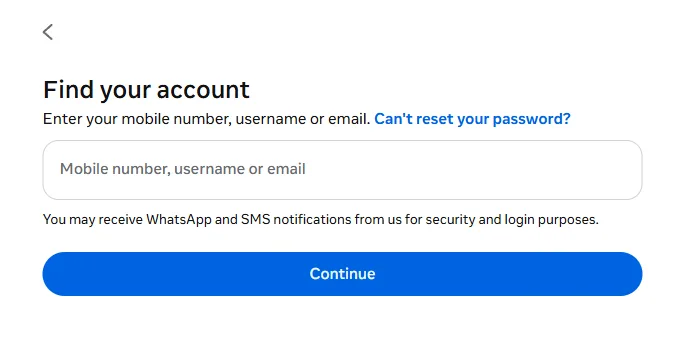
- The “Find your account” page appears. Enter one of the details in the “Mobile number, username or email” field. The email address or phone number linked to the account (with the country code) gives a more accurate match than the username.
- After the “Continue” button, Instagram shows where it can send a message. The addresses and numbers are partly hidden with asterisks, so it is possible to check whether a contact detail still in use is listed.
- Choose the channel, then open the email, text message or WhatsApp message.
- Tap the link in the email or enter the code received, then enter the new password twice.
Where can the link or code arrive?
- Email: the email contains a reset link or a code. Genuine emails come from the instagram.com domain (for example mail.instagram.com); an “Instagram email” from any other sender may be phishing.
- Text message: a code arrives at the phone number saved for the account. This needs a mobile network; Wi-Fi is not enough.
- WhatsApp: if the phone number also has WhatsApp, the code may appear there. The notice below the form also says that WhatsApp and SMS notifications may be sent for security and login purposes.
- Facebook account: if the Instagram account is linked to a Facebook account in Accounts Center, ownership can also be confirmed by logging in to Facebook, after which a new password can be entered.
If the account is still logged in on the phone
In an app that is logged in, the password can be changed without a code. On the profile, open “Accounts Center” from the menu, then the “Password and security” section, and choose to change the password. If the old password is not known either, the system offers the forgotten password option here too. From 2026, Accounts Center may gradually appear under the name “Meta Account”; the menu items stay in the same place.
If none of the contact details work
A common case: an old work email address, a cancelled phone number, a closed mailbox. In this case, choose the “Can't reset your password?” link on the “Find your account” page and follow the steps shown. Realistically, the options are:
- First, try to recover the mailbox or the number: the email provider's own recovery (“forgot password” option) or a replacement SIM card from the mobile carrier is often the quickest route. Instagram cannot help with recovering an email account.
- Linked Facebook account: the Facebook route described above works even if the email address no longer exists.
- If neither is available: according to the Instagram Help Center, without an accessible email address and a linked Facebook account, it cannot give access to the account. In some cases, especially when hacking is suspected, the system verifies identity with a video selfie; this is a short recording of the face taken from several angles.
- If hacking is also suspected (changed email address, unknown posts), follow the guide Hacked Instagram account: first steps.
Typical errors
- “No account found”: a typo, or the username has changed in the meantime. Try again with an email address or phone number used earlier.
- Expired link: the reset link only works for a limited time, and a newer request invalidates it. Always use the most recent email.
- Too many requests: after repeated attempts, Instagram temporarily stops sending messages. In this case, it is worth waiting for hours, or even a day.
- The new password is not accepted: it must be at least 6 characters long, and a password that is too simple or was used before may be rejected.
After the new password
- Update the old password in the password manager and the browser.
- In the “Personal details” section of Accounts Center, it is worth bringing the email address and phone number up to date.
- Keep the backup codes for two-factor authentication (“Two-factor authentication” in the menu): with these, logging in is possible without a text message or email.
If it doesn't work
The code or email does not arrive. What can be done?
Check the spam folder and WhatsApp, then request a single new code after a few minutes. Details: Instagram confirmation code not arriving.
I received a password reset email I did not request. Is the account at risk?
Not necessarily: anyone can type someone else's email address into the form, and the password can only be changed with the link or code. In January 2026, many people received such emails; Meta said it had fixed a bug and that the emails could be ignored. There is no need to click the link in this case.
I signed up with Facebook and never had an Instagram password. What should I do?
Log in with the “Log in with Facebook” option, then a separate Instagram password can be set in the “Password and security” section of Accounts Center. This way the account stays accessible even if Facebook cannot be accessed.
Can a new account be created with the same email address?
An email address can only belong to one account at a time, so the old account has to be recovered first. If the old account is permanently lost, a new one can be started with a different address: Creating an Instagram account step by step.