Resetting a forgotten Netflix password
A forgotten password is rarely a cause for worry on Netflix: a reset link can be requested to the account's email address, and a verification code to the linked phone number. Anyone who just wants to watch does not even need a password, because signing in also works with a code sent by email or text message. Things are harder if the registered email address or phone number is no longer accessible either; there is a solution for that too.
In this article
Quick workaround: signing in with a code
If the goal is just to keep watching, there is no need to reset the password first. On the sign-in page, after the email address or phone number is entered, Netflix sends a 4-digit code that completes the sign-in without a password. The password can be sorted out later. The steps: Signing in to Netflix with a password or a one-time code.
Requesting a new password by email
- Open the netflix.com/LoginHelp page. The page titled “Update password, email or phone” appears.
- Choose “Email” as the reset method.
- Type the account's address into the “Email” field, then click “Email Me”.
- In the Netflix email, click the “Reset your password” button. The link is valid for 24 hours from the request.
- Enter the new password twice. It cannot be the same as the last password, and Netflix does not accept overly common or leaked passwords either (“This password is not secure or is too common”).
- It is best to leave the “Sign out all devices” box checked, then click “Save”. Netflix also sends a confirmation email.
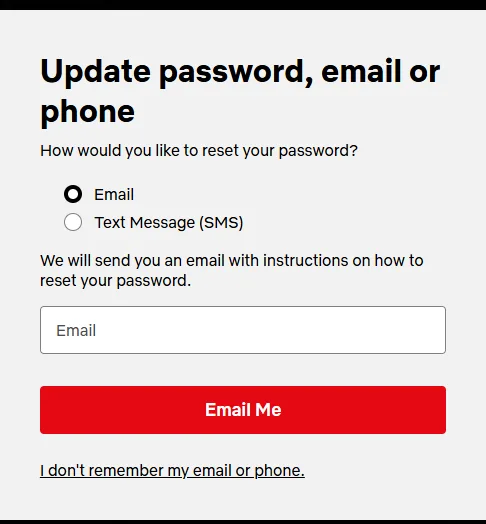
Requesting a new password by text message
This only works if a mobile number is linked to the account. On the LoginHelp page, choose “Text Message (SMS)”, enter the phone number and send the request. Type in the verification code that arrives by text message, and after verification, enter the new password twice. The code expires after 20 minutes. If the account has no phone number yet, only the email route is available for now; after signing in, it is worth adding one on the “Account” page with “Add phone number”, and an outdated number can be replaced with “Change phone number”.
If the email or the link does not work
- The email does not arrive: look in the junk and promotions folders too. The Help Center suggests adding [email protected] to the contacts and then requesting the email again. Because of delays at the email provider, it can take up to five hours to arrive.
- The link shows an error: it has expired, or a newer email was requested in the meantime. Delete all old Netflix reset emails, sign out with the netflix.com/clearcookies page, then request a new reset and use the link in the most recent email. Another computer or phone may also help.
- The text message does not arrive: further steps: Netflix sign-in code or link not arriving.
If neither the email address nor the phone number is known
When paying by bank card, the account can be found using the card. On the LoginHelp page, click the “I don't remember my email or phone.” link, enter the first and last name on the account and the number of the card that pays for Netflix, then choose “Find Account”. If there is a match, Netflix sends a reset email to the account's email address. If the link is not shown, this option is not available in that region. If Netflix is billed by a provider, the Help Center article for that provider helps; with a gift card or other payment method, or if the account's email address is no longer accessible, contact customer service.
- netflix.com/LoginHelp
- “Email” or “Text Message (SMS)”
- Link or code
- New password, “Sign out all devices”
- “I don't remember my email or phone.”
- Name and bank card number
- “Find Account”
- If there is no match: customer service
Special cases
- People who sign in with an email address added to a profile: they have no password of their own, so there is nothing to reset; they have to sign in with a code or ask the account owner.
- Saved password: after a password change, the browser's or phone's password manager may offer the old password; it has to be updated or deleted.
- Kids profile: the password cannot be changed from a Kids profile; switch to an adult profile first.
- Someone else changed it: if a confirmation email arrived about a password or email address change that was not requested, that already points to a hacked account: Hacked Netflix account: first steps.
If it doesn't work
Are the profiles or “My List” lost when the password is reset?
No. A password change only affects signing in; profiles, viewing history and the membership remain.
Does the TV get signed out after the new password?
If “Sign out all devices” was checked, yes; in that case, sign in again on every device. On a TV, this does not require typing the password: Signing in to Netflix on a TV with a phone or a code.
A reset email arrived without being requested. Is something wrong?
Someone may have typed the address on the reset page. As long as nobody clicks the link, the password does not change; the email can be ignored, but if it keeps happening, changing the password is advisable.