Hacked ChatGPT account: first steps
When a ChatGPT account falls into someone else's hands, more than the subscription is at risk: the intruder can read earlier conversations, uploaded files and personal details stored in memory. According to OpenAI, leaked login details mostly come from malware running on users' own computers or from passwords reused elsewhere. The order of the steps depends on whether the account can still be logged in to.
In this article
Warning signs
- Unknown conversations, in another language or on strange topics, appear in the sidebar, or your own conversations disappear.
- An unknown device, browser or location is listed under “Active sessions”.
- Unexpected emails arrive from OpenAI about a verification code, a login, or a password or email address change.
- Memory contains a “memory” the owner never provided, or the custom instructions have changed.
- An unknown custom GPT, project, scheduled task or shared link appears.
- Billing shows an unexpected charge or plan change, or the account has reached its usage limit despite hardly being used.
- The password suddenly stops working, or the account's email address has changed.
- Malware scan on your own device
- New password
- Log out of all devices
- Multi-factor authentication
- Review memory, instructions, links
- Check billing
1. Checking your own device
If the password was stolen by information-stealing malware, the new password can be stolen too. So first run a full scan with an up-to-date antivirus program on the computer and phone being used, and remove unknown browser extensions. Fake “ChatGPT” desktop programs or extensions are not worth keeping either: the official apps can only be downloaded from chatgpt.com, the App Store and Google Play (Installing the ChatGPT app on a phone or computer).
2. New password and logging out
- Log in at chatgpt.com, and in the account menu open “Settings”, then “Security”.
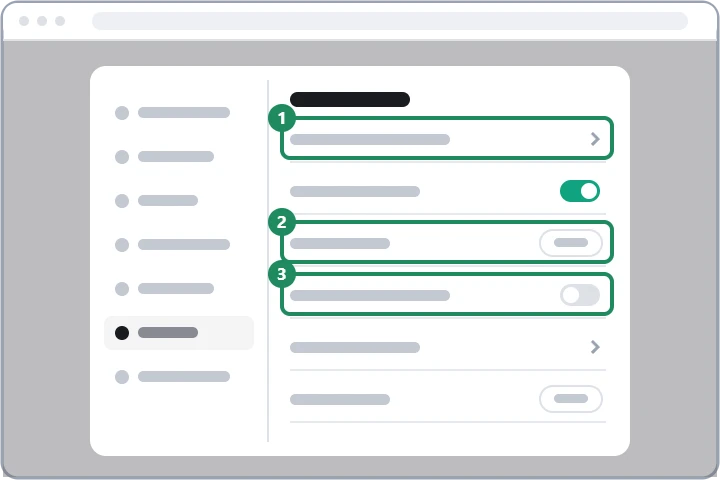
- Set a new password here (1). The new password should be long and not used anywhere else; wherever the old one was also in use, change it there too, starting with the email account linked to ChatGPT.
- Under “Active sessions” (2), log out unknown devices one by one, or all of them at once. According to the help, ending all sessions can take up to 30 minutes.
- With Google or Apple login there is no ChatGPT password: change the password with the provider and log out unknown devices there too, then end the ChatGPT sessions in the same way.
3. Turning on multi-factor authentication
In the same section (3), multi-factor authentication with an authenticator app can be turned on, and a passkey can be added. This way, a password that leaks again is no longer enough on its own to log in. Keep the recovery code received when turning it on separately, not on the phone. Detailed steps: Two-step verification and passkeys in ChatGPT.
4. What the intruder may have left behind
- Memory and custom instructions: an instruction or memory entered by a stranger can quietly influence later answers. Review them under “Settings” → “Personalization” and delete anything unfamiliar.
- Shared links: in the data controls, the “Manage” button next to “Shared links” lets you delete links you did not create. Details: ChatGPT privacy settings.
- Connected apps: if Google Drive, email or another service was connected to the account, disconnect it, and consider changing the password on that service as well.
- Custom GPTs, projects, scheduled tasks: delete any unknown ones.
- Billing: in the billing section of “Settings”, check the plan and the payment method. For unauthorized charges, also notify the bank that issued the card.
- Developer account: anyone who also uses the OpenAI API should check at platform.openai.com, with the same login, that there are no unknown API keys.
If logging in no longer works
If the password reset email still arrives in your own mailbox, a new password can be set with it, followed by the steps above. If the intruder has also changed the account's email address or turned on their own multi-factor authentication, ask OpenAI support for help: describe the situation in the chat window at help.openai.com. It helps to give the account's original email address and, for a subscription, the last four digits of the card and the date of the last payment. Never send the full card number or the password; OpenAI does not ask for them. If the email account has also been taken over, recover it first, for example: Gmail, Outlook.
If it doesn't work
Could the intruder see my earlier conversations?
Yes, whoever logged in could open every conversation in the sidebar that had not been deleted, and the files uploaded to projects too. If these contained a password, card number or other sensitive data, change it or have it blocked as well.
Someone is chatting in my account, but the password has not changed. Was it hacked?
Perhaps an old login simply remained on a borrowed or shared computer. Logging out of all devices and changing the password helps in this case too.
Is it worth deleting the account and opening a new one?
Deletion is permanent, and the conversations and the subscription are lost too, so recovering the account is usually better. If that is still the choice: Permanently deleting a ChatGPT account.