I can't sign in to my Google Account: how account recovery works
If the password does not work, the verification code never arrives, or the old phone number now belongs to someone else, the way back into a Google Account is account recovery. The process is automatic: Google decides from the available evidence whether the person asking is the account owner, and support staff cannot override that decision manually. The chances therefore depend on how much information is still available and how familiar Google is with the device the request comes from.
In this article
Starting the recovery
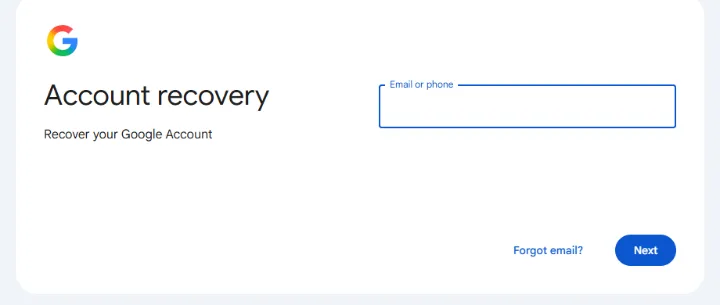
Recovery starts at g.co/recover, which leads to Google's “Account recovery” page. The forgotten-password link on the sign-in page goes to the same place. If only the password is lost but the recovery phone number or email address is still available, the process takes a few minutes; those steps are described in Resetting a forgotten Gmail password.
- Type the account's address or number in the “Email or phone” field, then select “Next”.
- If the account address is not known either, the “Forgot email?” link can find it using the recovery phone number or email address and the name on the account.
- Google then offers, one after the other, the verification methods available for that account. If an option cannot be used, another method can be requested on the screen.
- After successful verification, set a new password that is not used anywhere else.
- g.co/recover, email address or phone number
- Approve the prompt or enter the code
- Set a new password
- Update the recovery details
- Start from the usual device and location
- Last known password, best guess
- Give a contact email that works
- Wait, then try again if needed
What does Google ask?
The order of the questions varies from account to account, because Google only asks about what it knows about that account. The most common steps:
- A prompt on a signed-in device: on a phone or tablet signed in to the account, confirm that it really is the owner trying to sign in.
- A code sent to the recovery phone number or email address: it arrives by text message or email and has to be entered in the field provided.
- The last known password: an older password can help too; the more recent it is, the more it counts.
- Recovery contacts: if such people were added to the account in advance, the contact has to pick the number shown on the screen from three options on their own device, within 15 minutes.
- Phone number sign-in on Android: on some Android devices, the account linked to a phone number can also be verified with the screen lock of the previous device; the feature is rolling out gradually.
If neither the password nor the recovery details are available
Symptom: at the end of the process the message “Google couldn't verify this account belongs to you” appears. Cause: Google did not receive enough evidence, which is strict by design for security reasons. Solution: the request can be started again, and the following tips improve the chances.
- Use the device and browser that were often used to sign in to the account, from the usual place (for example the home or work network).
- Answer every question, with a best guess rather than skipping it. A wrong answer does not end the process.
- With the password, watch out for upper and lower case and for typos.
- If Google asks for an email address, give one that is accessible now and was connected to the account (recovery, secondary or contact address).
- Google's emails may end up in the spam folder, so check there too.
How long does it take?
If the code or the prompt works, recovery happens immediately. If Google sees a risk (for example the request comes from an unknown device), it sets a waiting period that can last from a few hours to several days; with 2-Step Verification turned on it can be longer. This protects the account: Google notifies the recovery address and number in the meantime, so the real owner can reject a request they did not start. If a previously used, signed-in device turns up in the meantime, it is worth trying again on it, as this can speed up the process.
If recovery fails for good
For a free Google Account there is no phone or email support that can hand the account back manually after a failed recovery, and paid “account recovery” services cannot do any more; such offers are often scams. If every attempt fails, a new Google Account can be created, and contacts and service providers should be told about the new address. If the suspicion is that someone has taken over the account, the order in Hacked Google Account: first steps comes next. Up-to-date recovery details protect against being locked out in the future: Setting up a recovery phone number and email address for a Google Account.
If it doesn't work
Can I call Google to help me get my account back?
No. There is no phone-based account recovery for free personal Google Accounts, and Google does not make phone calls about this either. Anyone promising it usually wants the verification code: Google Account scams and fake security alerts.
The text message code doesn't arrive because I'm abroad. What can be done?
Ask for another method (a prompt on a signed-in device, a code by email), or try again after returning home, from the usual device. Details: Signing in to Gmail from abroad: when the text message code does not arrive.
Can the account be restored if I deleted it earlier?
Only for a short time after deletion, and not always. If recovery is still possible, start on g.co/recover in the same way. On the effects of deletion: Deleting Gmail or closing the whole Google Account.