Creating a Google Account without Gmail, with an existing email address
A Google Account does not require a new Gmail address. During registration, it is possible to choose an existing email address as the account's identity, such as an Outlook, Yahoo or work address. YouTube, Google Play, Drive and the other Google services can then be used in the same way, while emails keep arriving in the old mailbox.
In this article
When does it make sense to register without Gmail?
- When a well-established email address already exists, and a second mailbox is not needed just to subscribe on YouTube or download an app from Google Play.
- When a Google Account is needed alongside a work or school address, for example to edit a shared Google Doc or accept a Google Calendar invitation.
- When someone wants to use an address on their own domain for a Google Maps review, a Google Ads account or a Business Profile.
- When a family member only wants to use Drive or Photos, and everyone already knows their existing address.
Registration steps
On a phone, the same process starts when adding an account in Android settings, or on the sign-in screen of Google apps; the order of the steps may differ slightly.
- On the accounts.google.com sign-in page, click the “Create account” button, then choose “For my personal use” from the drop-down list.
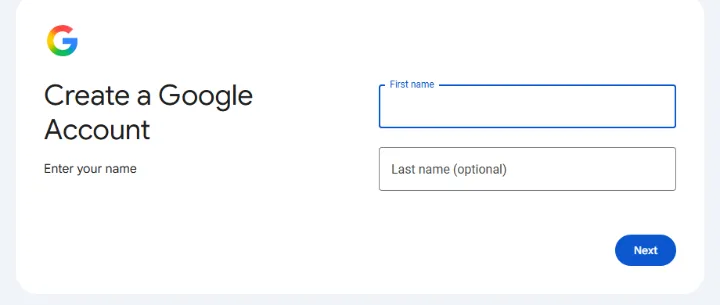
- On the “Create a Google Account” page, fill in the “First name” field; “Last name (optional)” can be filled in or skipped. Then click “Next”.
- The next step asks for date of birth and gender. Google uses the date to decide whether an independent account can be opened: the minimum age varies by country, and below it a parent can create an account for the child.
- When choosing an email address, Google suggests Gmail addresses. Here, choose “Use your existing email or phone number”, enter your own address and click “Next”.
- Google sends a verification code to that address. Enter the code from the email and click “Next” again.
- Finally, set a strong password and complete registration with the steps shown on screen (phone number, accepting the terms).
If the verification code does not arrive
- Check the spam, promotions and social folders in the old mailbox as well.
- Make sure the address was typed correctly; a single wrong letter sends the code to a different address.
- After waiting a few minutes, a new code can be requested; the most recently received code is always the valid one.
- If Google says the address is already taken, a Google Account already exists for that address. In that case, sign in instead of opening a new one; for a forgotten password, account recovery helps.
How is it different from Gmail registration?
- No new mailbox: emails stay with the old provider, and the Gmail app does not fill this account with messages.
- The sign-in name is the old address: Google services are accessed with this address and the (new) password set for the Google Account, not with the mailbox password.
- The address can be changed: unlike a Gmail address, an address from another provider can later be replaced with another existing address in the account's “Personal info” section.
- The mailbox's future matters: if the old address is closed, Google can no longer send codes to it. That is why it is important to add separate recovery details as well: Setting up a recovery phone and recovery email.
- If a new mailbox is needed too, it is created the usual way: How to create a Gmail account, step by step.
Adding a Gmail address later
If Gmail is needed later after all, a Gmail address can also be requested for the existing account: Google offers to create one the first time Gmail is opened. The Gmail address then becomes the account's primary address and username, and this step cannot be undone. The old address can remain in the account as a secondary address. Anyone who wants two separate accounts should rather open a new one and use them side by side: Using multiple Gmail accounts on one device.
First steps after creating the account
- On myaccount.google.com, add a recovery phone in the “Security & sign-in” section.
- It is worth turning on 2-Step Verification or creating a passkey.
- The old mailbox password and the Google Account password should be different, so that a leak of one does not open the other.
If it doesn't work
Will the password be the same as my old mailbox's?
It does not have to be, and it is not recommended. The Google Account password is a separate password set at the end of registration; Google neither asks for nor knows the old mailbox password.
Can an account be opened with a phone number instead of an email address?
According to the help, a phone number can be entered instead of an existing email address in some cases. Whether this is available depends on the country and the registration method.
Will the Google Account be deleted if I delete my old mailbox?
No, the account remains, but its sign-in identity becomes an address that no longer works. Before that, it is worth switching to another address in the “Personal info” section, otherwise recovery becomes difficult.
Can I use the Gmail app for my old mailbox?
Yes, the Gmail app can also display mailboxes from other providers, but this setting works with the mailbox's own details, not with the Google Account.