Filling in the Microsoft account recovery form
The account recovery form helps when the Microsoft account password is unknown and the email address, phone number or Authenticator added to the account is not available either. The form asks about earlier use of the account, and Microsoft compares the answers with the information stored in the account. The more accurate and complete the details, the better the chance of success.
In this article
When does the form make sense?
Filling in the form takes time, so it is only worth starting once the quicker routes have failed: the password reset with a code and Microsoft's sign-in helper. If the password is known and only the security info is out of date, the form is not needed; instead, choose the “I don't have any of these” option when signing in, which replaces the information after a 30-day wait.
- The form cannot be used
- Only the verification methods set up or the recovery code can help
- Check every old phone, email address and password manager
- Try the sign-in helper
- Gather the details
- Fill in the form at account.live.com/acsr
What is worth gathering in advance?
The form only asks about services actually used with the account. According to the help, guessing is allowed: a wrong answer does not count against the applicant, but a field left empty proves nothing.
- Old passwords: every password the owner may ever have used for the account, even on other sites. Checking the passwords saved in the browser (Edge, Chrome) and in iCloud Keychain is worthwhile.
- Outlook.com or Hotmail account: exact email subject lines and the email addresses of people the account has written to. Old emails from family members and friends can help. The country ending of the addresses matters too (for example @outlook.co.uk).
- Registration details: name, date of birth and place of residence as they were when the account was created; the state before a move or a name change may be the correct one.
- Skype: the Skype name, contacts' names, phone numbers called and the details of the latest Skype purchase.
- Xbox: the hardware ID of the console used most; with a new console, the old one's ID matters more.
- Purchases: products and subscriptions bought with the account and the details of the bank card used, if the form asks for them.
Filling in the form
- Open the account.live.com/acsr page. The help recommends filling it in from a device and a location (for example at home) where the owner used to sign in regularly.
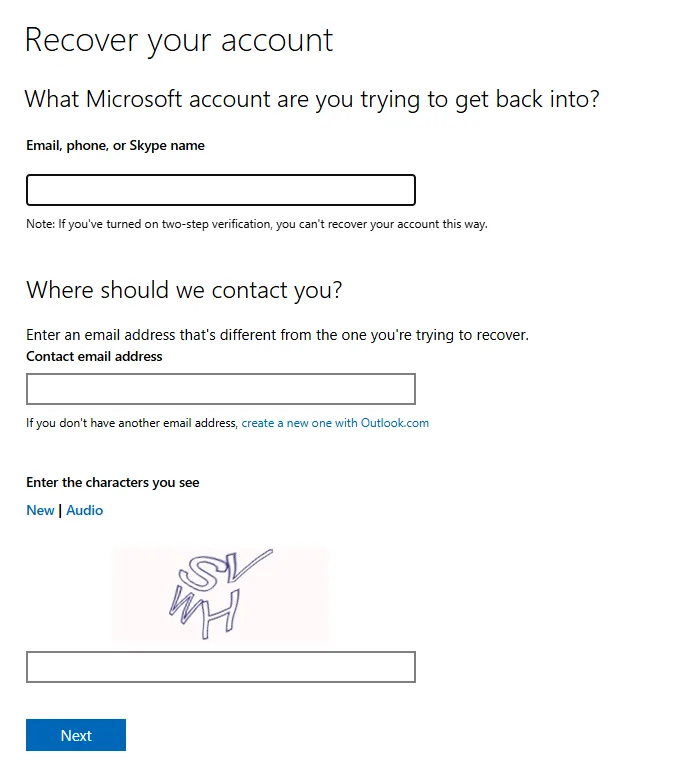
- On the “Recover your account” page, under “What Microsoft account are you trying to get back into?”, type the account's identifier into the “Email, phone, or Skype name” field.
- In the “Contact email address” field, enter another working address that must differ from the one being recovered. It can belong to a family member; if there is none, the link below the field creates a free Outlook.com address.
- In the “Enter the characters you see” field, type the characters shown in the image (“New” gives another image, “Audio” an audio version), then click “Next”.
- Microsoft sends a code to the contact address; enter it, and the questions follow. Where the form allows more details to be added, providing as many as possible is worthwhile.
After submitting: reply, success, rejection
- Reply time: Microsoft sends the result to the contact address within 24 hours. Keep an eye on the junk email folder too.
- Successful verification: the email explains how to sign in again and set a new password. After that, update the security info right away: Recovery email and phone number in a Microsoft account.
- Rejection: the form can be submitted again any number of times, but at most twice a day. Sending the same answers again is pointless; look for a new password, email subject line or recipient to add.
- “The Microsoft account doesn't exist”: check the spelling of the address first. If it is correct, the account may have been deleted, for example because of long inactivity.
What customer support cannot bypass either
Microsoft agents cannot send password reset links, cannot access the account and cannot change its details, so they cannot replace or speed up the form either. Anyone offering paid “account recovery” by phone, chat or on social media is a scammer. If the account was hacked and the attacker replaced the information, the form can be used in the same way; further steps: Hacked Microsoft account: first steps.
If it doesn't work
Can the form be filled in on a phone?
Yes, in a browser on any device. The chance of success improves if it is done from a device the owner used to use the account on regularly.
How long does the reply take?
According to the help, at most 24 hours. If nothing arrives by then, check the junk email folder of the contact address and make sure the address was typed correctly.
Is there any point in submitting the same thing many times?
No. At most two submissions a day are possible, and only new or more accurate details improve the result.