Recovery email and phone number in a Microsoft account
Microsoft uses the security info added to the account (another email address, phone number, Authenticator, passkey) to check that it really is the owner signing in, changing something or requesting a new password. If this information is out of date, getting back in after a forgotten password or a hack can take weeks, or may only succeed with the recovery form. Maintenance takes a few minutes while signing in still works.
In this article
What is security info for?
The security email address does not have to belong to the owner, it is enough to have access to it: it can be a family member's address, for example. An alias of the same account, however, cannot be added as a security address, because it is part of that account (more on aliases: Adding and managing an Outlook.com email alias).
- Password reset: the one-time code arrives here if the password is lost: Resetting a forgotten Microsoft account password.
- Unusual sign-in: for a sign-in from a new country, a new device or a suspicious network, Microsoft asks for verification with one of them.
- Sensitive changes: before a password change, closing the account or rewriting the security settings, the system also asks for a code.
- Notifications: Microsoft uses these addresses to report when someone has signed in or changed something, so an attack is discovered sooner.
Adding and replacing step by step
Up to 10 sign-in and verification methods can be added in total. Setting up at least two, on independent devices, is recommended.
- Open the account.microsoft.com/security page and sign in. Microsoft may ask for a verification code at this point too.
- The “Manage how I sign in” option leads to the list of security info (the direct address is account.live.com/proofs/manage; the help also calls it “Additional security options”).
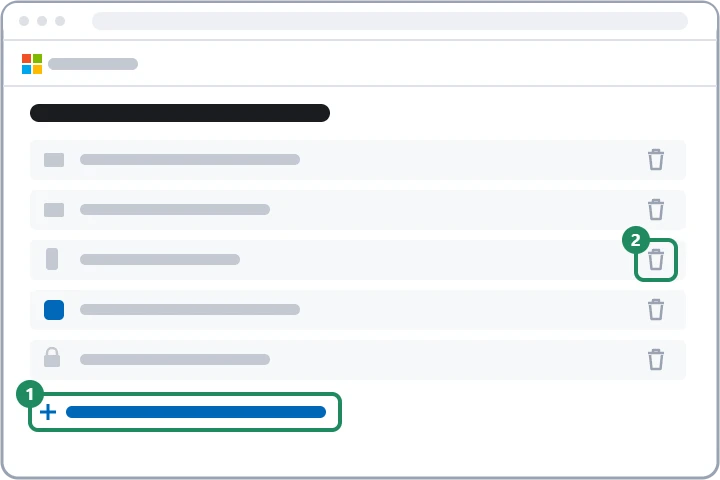
- With “Add a new way to sign in or verify”, choose what kind of information to add: an email address, an authenticator app or a passkey.
- Microsoft sends a code to the new address; enter it and confirm with “Next”. From then on, the new information appears among the options for receiving codes.
- An old address or number that is no longer reachable can be removed in its row of the list – but only once the new information is set up and working.
Phone number: what changed with text messages?
According to Microsoft's help, Microsoft is gradually ending text messages for sign-in and recovery of personal accounts, because SIM swapping and phishing make it the most vulnerable method. As a result, adding a new phone number may no longer be possible, and the list may only offer an email address, Microsoft Authenticator or a passkey. A number already added can stay for now, but relying on it in the long run is not advisable. Of the replacements, a verified email address is good for resets and a passkey for fast, phishing-resistant sign-in: Setting up a passwordless Microsoft account. Setting up Authenticator and what to do before replacing a phone: Two-step verification and Authenticator for a Microsoft account.
Why is there a 30-day wait?
If none of the old security info is available and the owner replaces all of it, Microsoft keeps the change pending for 30 days. This protects against hacking: if a scammer obtained the password and replaced all the information, the real owner has a month to notice and stop it.
- During the wait, the account can usually be used, but actions that require a verification code do not work, and some pages show a “pending” message. According to the help, closing the account is only possible after 60 days in this case.
- The wait cannot be shortened, and customer support cannot speed it up either.
- If an old piece of information turns up after all, the pending request can be cancelled on the security page, and the account is immediately fully usable again.
- If the owner did not start the change, act immediately based on the notice sent to the old address: Hacked Microsoft account: first steps.
- Code to the old information
- Add the new information
- Delete the old one
- Valid immediately
- Enter the new information
- Notice to the old addresses
- 30-day wait
- Valid afterwards
If signing in no longer works
With outdated information, choose the “I don't have any of these” option at sign-in. If the password is known, new information can be entered and the 30-day wait begins. If the password is not known either, the recovery form remains. If the information is correct and only the code does not arrive: Microsoft account security code not arriving.
If it doesn't work
Which address do real Microsoft codes come from?
Notifications and codes about the account come from the @accountprotection.microsoft.com domain. Only enter a code if the owner requested it.
Can I add my work email address?
It can be added, but access ends when leaving the job, and the address becomes useless. A private mailbox kept for the long term is a better choice.
What happens if my old phone number has been given to someone else?
Then the codes may go to a stranger. Remove the number from the list as soon as possible and replace it with an email address or a passkey.