Unlocking a locked or suspended Microsoft account
If the Microsoft account shows a lock or block at sign-in, Outlook.com, OneDrive, Xbox and Windows sign-in may all stop working. The message can have several causes: a precaution after a suspicious sign-in, too many wrong passwords or, less often, a violation of the Microsoft Services Agreement. In the first two cases the account can usually be unlocked in minutes; in the third, a review has to be requested.
In this article
Symptoms and causes
- “You've tried to sign in too many times with an incorrect account or password”. Cause: several wrong passwords in a row, another person trying with the wrong address, or a faulty app, browser or network. This is a temporary limit: wait, then reset the password if unsure of it.
- Verification is required at sign-in and the account is locked. Cause: Microsoft detected a sign-in from an unusual location or device, for example because of travel, a new phone or a new app. The account is temporarily blocked until the owner verifies with a code.
- An “Account has been locked” message, with no verification offered. Cause: according to the help, suspicious activity or a violation of the Services Agreement, such as spam, phishing, spreading malware, or an account created by a bot or registered with false details.
- “Security info change is still pending”. This is not a lock: someone replaced all the security info, and the account works in a limited way for 30 days. Details: Recovery email and phone number in a Microsoft account.
- Only sending email is blocked. If Outlook.com does not allow sending email but the account otherwise works, a separate article covers it: Outlook.com won't let you send email.
Unlocking with a security code
When the account is blocked because of suspicious activity, the sign-in process itself guides the owner through unlocking.
- Open account.microsoft.com and sign in with the account.
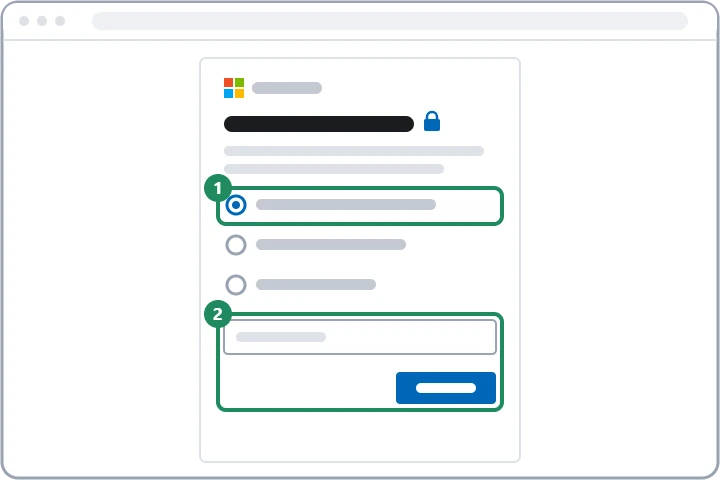
- On the page reporting the lock, continue, then choose where Microsoft should send the security code (the email address or phone number added to the account, or Microsoft Authenticator).
- If the page asks for a phone number, enter a mobile number that can receive text messages; it can be different from the number linked to the account.
- Enter the code received and confirm.
- After unlocking, the account can be used immediately, on other devices too.
If the code does not arrive or no method can be chosen
If the code does not arrive, the most common causes are the junk email filter, SMS filtering and a temporary block caused by many code requests in a row: Microsoft account security code not arriving. While travelling, it may also help to sign in from a familiar device already used as trusted; according to Microsoft's help, the account then becomes available again from the usual location or device. If none of the security info works and the password is not known either, the article Filling in the Microsoft account recovery form helps.
Account locked for a violation: requesting a review
If the account was blocked for violating the Services Agreement or the Code of Conduct, a code does not help. The aka.ms link shown in the lock window, or the Account Reinstatement Request form, leads to the review.
- In the blocked account ID field, enter the account's email address, phone number or Skype name, and below it the name associated with the account and another working contact email address.
- Choose the account type and the problem experienced, for example that the account is temporarily blocked.
- In the text field, describe objectively what happened and why restoring the account is justified; do not enter passwords or confidential information.
- After submitting, an agent replies by email. Sending further requests is not worthwhile, because according to the help this slows down the reply, and Microsoft does not send updates on the status of individual requests.
Xbox suspension and payment restrictions
Suspension of Xbox services for violating the community standards is a separate procedure and does not always affect the whole Microsoft account: Can’t sign in to Xbox. And if a subscription is paused because the card expired or a charge failed, it is enough to update the payment method in the account's “Payment & billing” section.
After unlocking
- If the lock was caused by a suspicious sign-in and the owner had not travelled or changed devices, change the password and check the recent activity. The full to-do list: Hacked Microsoft account: first steps.
- Authenticator approval also triggers fewer alerts when travelling than text messages: Two-step verification and Authenticator for a Microsoft account.
If it doesn't work
How long does the “too many wrong passwords” restriction last?
Microsoft does not give an exact time. Waiting a few hours without trying is recommended, then resetting the password if unsure of it: Resetting a forgotten Microsoft account password.
Can Microsoft support unlock the account over the phone?
No. Agents cannot send a link for a new password and cannot change the account's details. Anyone who offers this by phone or asks for a sign-in code is a scammer: Recognizing scams in Microsoft's name.
Are emails and OneDrive files lost while the account is locked?
With a temporary block for suspicious activity, the content remains, it just cannot be accessed. With a lock for a violation, the outcome of the review decides whether the account can be restored.