Forgot your Facebook password? How to reset it
A forgotten password is no reason to create a new account: if the email address or phone number on the account is still available, a new password can be set in a few minutes.
In this article
- Click the “Forgot password?” link
- Enter the code received
- Set a new password
- Log out of other devices
- If the account is still logged in on a device: try there, in Accounts Center
- If there is no such device: No longer have the email or phone number
Requesting a new password
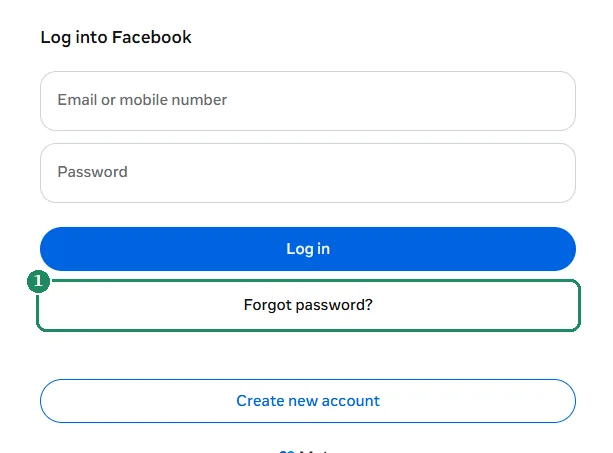
- Open www.facebook.com and click the “Forgot password?” link below the password field.
- The “Find your account” page opens. Enter the mobile number or email address on the account, then click “Continue”.
- Facebook shows the contact details linked to the account. Choose where the code should be sent (email or SMS), then continue.
- Enter the six-digit code received. If several codes arrived, use the most recent one.
- Set a new password that isn't used anywhere else.
- Facebook offers to log out of all other devices. If someone else may have used the account, or it was logged in on a shared computer, choose this option.

If the account is still logged in on the app
If the app hasn't been logged out, a new password can be set without a code:
- Open the menu, then “Settings & privacy”, and within it “Settings”.
- Choose “Accounts Center”, then “Password and security”.
- Choose “Change password”, then the account.
- If the old password isn't known either, a new one can be requested here as well with the forgotten password option.
Common errors and how to fix them
- The code has expired or is wrong: codes are valid only for a limited time. Request a new code and enter the most recent one.
- The new password isn't accepted: at least 6 characters are required, and passwords that are too simple are rejected. A longer password with letters, numbers and punctuation usually solves this.
- The browser fills in the old password: update the password saved in the browser or password manager, otherwise the next login will fail.
What makes a good new password?
- At least 12 characters: an easy-to-remember sentence is better than a short, complicated word.
- Not used anywhere else: if it leaks from another site, it shouldn't also open the Facebook account.
- A password manager (for example the phone's built-in one) can remember it.
After setting the new password
- In Accounts Center (accountscenter.facebook.com), check that the email address and phone number on the account are up to date.
- Turn on two-factor authentication under “Password and security”.
- Log out unknown devices: Where am I logged in?
If it doesn't work
The code doesn't arrive
Wait a few minutes, check the spam folder, and try the other contact method (SMS instead of email, or the other way around). Details: Facebook confirmation code not arriving.
I get a “No account found” message
Try another email address or phone number used in the past. The phone number can also be entered in international format, with a plus sign and the country code (for example +1… or +44…).
I no longer have the email address or phone number
In this case, Facebook tries other ways to confirm that the account really belongs to the person asking. Details: No longer have the email or phone number.
I got a password reset email I didn't ask for
Someone probably entered the email address or phone number into the account search. As long as nobody enters the code, the password doesn't change, so the email can be ignored. Never share the code with anyone.