Resetting a forgotten TikTok password
A forgotten password is no reason to open a new TikTok account: with a six-digit code sent to the email address or phone number linked to the account, a new password can be set in a few minutes. However, people who signed up with a Google, Apple, Facebook or X account often have no TikTok password at all, and instead of resetting it, they have to log in with the right button.
In this article
- Open the “Reset password” page
- Request a code with the “Send code” button
- After the six-digit code, enter a new password
- It is worth reviewing the logged-in devices
- External account: log in with the Google, Apple, Facebook or X button
- If the account is still logged in on a phone: update the contact details there
- Otherwise: submit a “Recover account” request
Requesting a new password by email
- Open tiktok.com/login and choose the “Use phone / email / username” option.
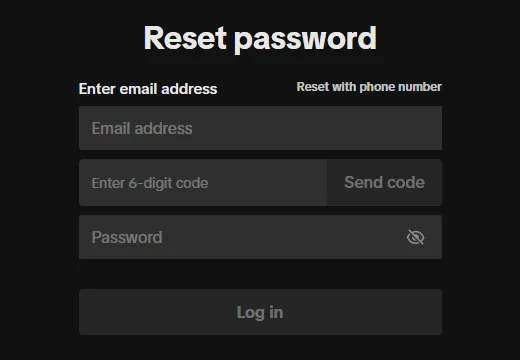
- For password login, click the “Forgot password?” link. The “Reset password” page opens (directly: tiktok.com/login/email/forget-password).
- Type the address linked to the account into the “Email address” field, then click the “Send code” button.
- Enter the code received by email in the “Enter 6-digit code” field. If the email does not arrive, check the spam folder too.
- Enter the new password in the “Password” field; the “Log in” button then logs straight into the account.
Resetting with a phone number
The “Reset with phone number” link at the top right of the form switches to the phone number version. Select the correct country code here, then enter the number with the area code but without the national trunk prefix. The code arrives by text message; the further steps are the same as for email. In the app, choose “Use phone / email / username” when logging in, then the “Email / Username” tab, and after the “Forgot password?” option, choose whether the code should go to a phone number or an email address.
If the account was created with a Google, Apple, Facebook or X account
With this kind of sign-up, TikTok accepts the login of the external service, and no separate TikTok password is created. That is why the reset form does not help, and it often returns an error along the lines of “account not found” if the email address of the external account is not linked to the TikTok account. What to do:
- On the login page, choose the button used when signing up (“Continue with Google”, “Continue with Apple”, “Continue with Facebook”), with the same external account.
- If the password of the external account has been lost, it has to be reset through Google, Apple or Facebook, not on TikTok. For Facebook, this article helps: Forgot your Facebook password? How to reset it.
- After logging in, it is worth adding a phone number or email address to the account under “Profile” → Menu ☰ → “Settings and privacy” → “Account” → “Account information”, and setting a TikTok password of its own under “Account” → “Password”. That way there is still a way back if the external account is lost.
If neither the email address nor the phone number works anymore
- Still logged in on a phone: update the contact details under “Profile” → Menu ☰ → “Settings and privacy” → “Account” → “Account information”, and set a new password under “Account” → “Password”.
- Not logged in anywhere: on the app's login screen, a recovery request can be submitted with “Forgot password?”, then “Recover account”. TikTok then asks for information linked to the account, such as the registered email address, phone number or previous passwords, and the support team gets back after a review.
- Someone else may have changed the contact details: this is already a hacked account; what to do: Hacked TikTok account: first steps.
Typical problems when resetting
- The code does not arrive: after many requests in a row, TikTok stops sending new ones for a while. Causes and solutions: TikTok verification code not arriving.
- “Unrecognized device” error message: with 2-step verification turned on, TikTok does not allow resetting the password from a device on which the account has never been logged in. Try from a previously used device, or submit a “Recover account” request.
- The new password is not accepted: TikTok requires a password of 8–20 characters containing at least two of the following: letters, numbers and special characters. A previously used password is not allowed again either.
- The browser fills in the old password: the saved password has to be updated in the password manager too.
After setting the new password
It is worth choosing a long password that is not used anywhere else, and storing it in a password manager. 2-step verification or a passkey also helps the next time a password is forgotten: 2-step verification and device management on TikTok.
If it doesn't work
Can a new password be requested with a username?
The web form asks for an email address or phone number. The code always goes to the contact details linked to the account, so at least one of them has to work.
I received a password reset code, but I did not request it
Someone entered the email address or phone number in the form, possibly by mistake. As long as no one enters the code, the password does not change. The code should not be sent to anyone, even if a friend asks for it in a message.
Are other devices logged out after the new password?
Yes. After the password is changed, TikTok logs the account out on all devices, so a stranger who was logged in also loses access. The new password then has to be used to log in again everywhere.
If I have no password, how do I log in on a computer?
With the external account's button, or with the “Use QR code” option from the app logged in on the phone. Details: Logging in to TikTok on a phone, computer or TV.